PalMutator
-
Download
Get the latest version from Nexus Mods.
⚙️ What It Does
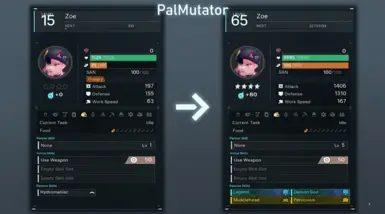
Apply custom passive skills, soul ranks, and IV talents to your summoned Pal with a single hotkey. Instantly heal and restore sanity. Duplicate Pals directly from your Palbox. All presets are fully configurable in config.lua.
Singleplayer Only
This mod only works in Singleplayer worlds.
🎮 Controls
- Alt + 1–9 : Apply a stat preset to your currently summoned Pal.
- Alt + H : Fully heal your active Pal (HP, sanity, and stomach).
- Alt + D : Duplicate a Pal in your Palbox.
📖 How To Use
Applying a Preset
- Summon the Pal you want to modify.
- Press Alt + 1 (or whichever number matches your preset) to instantly apply it.
- The Pal's level, talents, soul ranks, and passive skills will update immediately.
Healing
- Summon your Pal.
- Press Alt + H to fully restore HP, sanity, and stomach in one press.
Duplicating a Pal
- Open your Palbox and place the source Pal in Page 32, Slot 29.
- Place any Pal (it will be overwritten!) in Page 32, Slot 30.
- Press Alt + D.
- Slot 30 will now be an exact copy of Slot 29, including the pal type, stats, passives, and moves.
🛠️ Configuration
Edit config.lua inside the mod's Scripts folder:
- Presets : Define up to 9 stat presets, each bound to an Alt+number hotkey.
- KeyHeal : Rebind or disable the heal hotkey.
- KeyDuplicate : Rebind or disable the duplicate hotkey.
- PlaySound : Toggle the confirmation sound (default: true).
- EnableHUDLog : Show feedback messages on the HUD (default: true).
- EnableConsoleLog : Mirror messages to the UE4SS console (default: true).
🚀 Installation
Prerequisite Required!
You must install UE4SS before you can use this mod. If you haven't done this yet, please follow the UE4SS Installation Guide first!
- Locate your Palworld directory.
- Drop the PalMutator folder into your UE4SS Mods directory:
Pal\Binaries\Win64\ue4ss\Mods - Ensure
enabled.txtis present inside the mod's folder (it should be there by default). - Launch the game!