UniversalPicker
-
Download
Get the latest version from Nexus Mods.
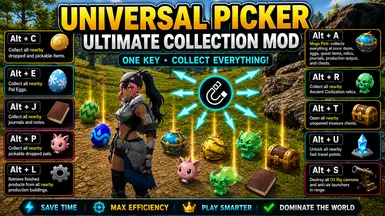
⚙️ What It Does
Collect items, eggs, relics, journals, chests, and characters from the world with a single hotkey. Unlock fast travel points, collect finished production output, and sabotage Oil Rig defenses, all without moving or going nearby them.
Singleplayer Only
For multiplayer security and in compliance with official Palworld modding guidelines, all actions are automatically blocked when connected to a dedicated server.
🎮 Controls
- Alt + C : Collect all nearby dropped and pickable items.
- Alt + A : Mega Pick – collects everything at once: items, eggs, quest items, relics, journals, production output, and chests.
- Alt + E : Collect all nearby Pal Eggs.
- Alt + R : Collect all nearby Ancient Civilization relics.
- Alt + J : Collect all nearby journals and notes.
- Alt + T : Open all nearby unopened treasure chests.
- Alt + P : Collect all nearby pickable dropped pals.
- Alt + U : Unlock all nearby fast travel points.
- Alt + L : Retrieve finished products from all nearby production buildings.
- Alt + S : Destroy all Oil Rig cannons and anti-air launchers in range.
🛠️ Configuration
Edit config.lua inside the mod's Scripts folder:
- KeyPickCommon : Rebind the common item pickup hotkey. (default: Alt + C)
- KeyPickAll : Rebind the Mega Pick hotkey. (default: Alt + A)
- KeyPickEggs : Rebind the Pal Egg pickup hotkey. (default: Alt + E)
- KeyPickRelics : Rebind the relic pickup hotkey. (default: Alt + R)
- KeyPickJournals : Rebind the journal pickup hotkey. (default: Alt + J)
- KeyPickChests : Rebind the chest opening hotkey. (default: Alt + T)
- KeyPickChars : Rebind the character pickup hotkey. (default: Alt + P)
- KeyUnlockPoints : Rebind the fast travel unlock hotkey. (default: Alt + U)
- KeyCollectProd : Rebind the production collection hotkey. (default: Alt + L)
- KeySabotage : Rebind the Oil Rig sabotage hotkey. (default: Alt + S)
🚀 Installation
- Locate your Palworld directory.
- Drop the UniversalPicker folder into your UE4SS Mods directory:
Pal\Binaries\Win64\ue4ss\Mods - Ensure
enabled.txtis present inside the mod's folder (it should be there by default). - Launch the game!